Device checks for SOC 2 and ISO 27001
Connect a computer to your NixGuard workspace, install the security agent in one click, and check the settings auditors ask about.
What it does
- Chat with Nix
- The app opens on a chat with Nix, NixGuard's security assistant. Ask whether the computer is protected, what is on your network or what to fix. Nix checks for itself, and asks you to approve each change before the app makes it.
- One-click agent install
- Sign in through your browser, then press one button: the app installs the NixGuard agent and shows when your security server sees the computer.
- Device checks
- Disk encryption, firewall, screen lock, system updates and malware protection, checked on the computer without administrator rights.
- Fix it from the app
- A failing check opens the exact setting to change, or turns on the screen lock for you, and checks again when you come back.
- Evidence for your audit
- Each computer's results appear in your NixGuard workspace, mapped to SOC 2 and ISO 27001 controls.
- Network devices
- Scan my network lists the printers, TVs, cameras, smart-home devices, routers and other devices the computer can see on its network, including devices that cannot run a security agent, and adds them to your workspace. It checks each one for risky open services, alerts you when a device probes the network, and its DNS filter can block every device from reaching known malware sites.
Chat with Nix
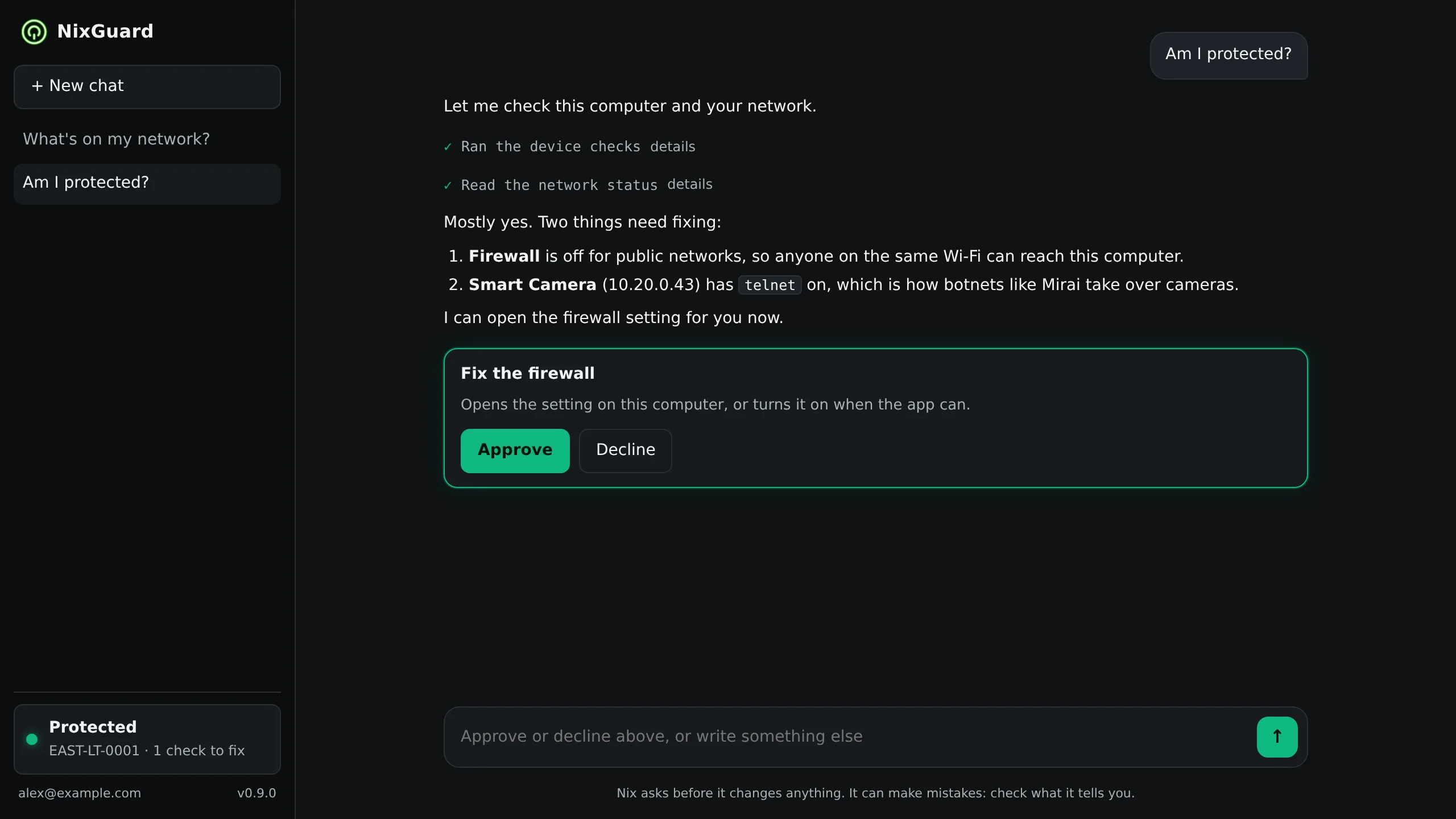
The NixGuard desktop app, with example data.
- Ask in your own words
- Ask "Am I protected?", "What's on my network?" or "Fix what's failing". Nix answers from your NixGuard workspace and from this computer.
- It checks for itself
- Nix runs the app's checks while it works, such as the device checks and the network status, and shows each one in the chat.
- You approve every change
- When Nix wants to change something, like opening a setting, scanning the network, turning on the DNS filter, setting up your router or fixing a device, it shows a card with Approve and Decline. Nothing changes until you approve.
- Your chats stay on the computer
- Chats are kept on the computer, encrypted, and deleted when you disconnect it. Each message uses your workspace's credits, as a chat in the NixGuard app does.
Every device on your network
- How it finds them
- From what devices announce about themselves over mDNS/Bonjour and SSDP/UPnP, and from the computer's own neighbour table.
- How it checks for risks
- On each device it found, it opens and at once closes a connection to 15 well-known ports whose service makes a device risky, like telnet or Android debugging. Your workspace shows what each open one means and how to fix it.
- Alerts
- NixGuard alerts you when a new device joins a network it already knows, and when a device shows a risk it didn't have before.
- Live alerts
- While the app runs, it listens on decoy ports that infected cameras and routers probe, and watches for a device posing as your router. Either one raises an alert in your workspace at once, naming the device.
- DNS filter
- Turn it on and point your router's DNS at the computer, and every device's lookups pass through the app. It blocks known malware, ransomware and phishing sites and tells you which device tried. NixGuard is told only about the lookups it blocked.
- Router setup
- On UniFi, OpenWrt and MikroTik routers, the app makes the DNS change for you: it shows the change first, makes it only when you confirm, and can undo it. For other routers it shows where to make the change. The router password is used for that change only, and never stored or sent to NixGuard.
- Let Nix do it
- For a router without that kind of access, or to fix a risk on a camera, printer or other device, Nix can open the device's own settings page in the app. You sign in yourself, Nix finds the setting, and it changes it only after you approve. You can stop it at any time.
- What it never does
- It never logs in to a device other than your router, and to the router only when you set it up. It checks no other addresses, and changes nothing on a device.
- When it scans
- Only after someone clicks Scan my network in the app. After that it scans again on its own while the app is running and connected to your workspace. Disconnecting stops it.
- What each device is
- Each device is listed by type: router, computer, phone, tablet, printer, TV or streamer, speaker, camera, storage (NAS), smart-home device or games console, or unidentified when NixGuard cannot tell. Devices that appear after the first scan are marked new.
- Ask Nix
- The devices appear in the Network devices list of your workspace, and Nix can answer "What's on my network?"
The checks, and the controls they map to
- Disk encryption
- SOC 2 CC6.7 · ISO 27001 A.8.24, A.8.1
- Firewall
- SOC 2 CC6.6 · ISO 27001 A.8.20
- Screen lock
- SOC 2 CC6.1 · ISO 27001 A.8.5
- System updates
- SOC 2 CC7.1 · ISO 27001 A.8.8
- Malware protection
- SOC 2 CC6.8 · ISO 27001 A.8.7
Each computer's results appear in the Computers view of your NixGuard workspace, and Nix can cite them as evidence.
Questions
Do I need an MDM?
No. The app runs the checks on the computer itself. If you already use Jamf Pro, NixGuard can read device evidence from it as well.
Does it need administrator rights?
The checks do not. Installing the NixGuard agent asks for administrator rights once.
Which systems does it run on?
Windows, macOS and Linux. There is an installer for Windows, a .dmg for Macs with Apple silicon or Intel, an AppImage for Linux, and a .deb for Debian and Ubuntu. The Mac version has not been tested on a Mac yet.
Why does Windows warn me when I open the installer?
The app is not code-signed yet, so Windows shows "Windows protected your PC" the first time you open the installer. Choose More info, then Run anyway.
Does NixGuard scan my network?
Only after someone clicks Scan my network in the desktop app. It then lists the devices the computer can see, from what they announce about themselves and from the computer's own neighbour table. It also checks each of those devices for a short list of risky open services, like telnet. It never logs in to a device and changes nothing.
Does the DNS filter see my browsing?
The computer running the app sees which sites the devices look up, as any DNS server does, and keeps only counts. It passes lookups on to public DNS (Cloudflare and Quad9), or to your router for local names. NixGuard is told only about lookups it blocked: the device, the site and which list it is on.
What does a network scan send?
It sends to your NixGuard workspace, for each device on the computer's own network, its private IP address, its MAC address, what it announces about itself, such as its name, model and type, and which of the risky ports it checks are open. It also sends the network's private address range, the router's private IP address, a one-way hash that identifies the network, the computer's name and the app's version. It sends no public IP addresses, no traffic and no browsing.